
Multicam sync for Mac and Windows
Drop a folder, get a synced timeline.
Hours of multicam footage, synced in minutes.
Every camera and recorder, lined up by sound and timecode.
- Your footage never leaves your computer
- Original files are never changed
- Free to try on a whole shoot
How it works
Three steps, no round trip
From card dump to edit-ready timeline, without touching your editor first.
Drop in your shoot
Drag in the shoot folder: one folder per camera or recorder, the way most cards come off set. Loose clips and single card folders work too. A timeline appears straight away.
Press Sync
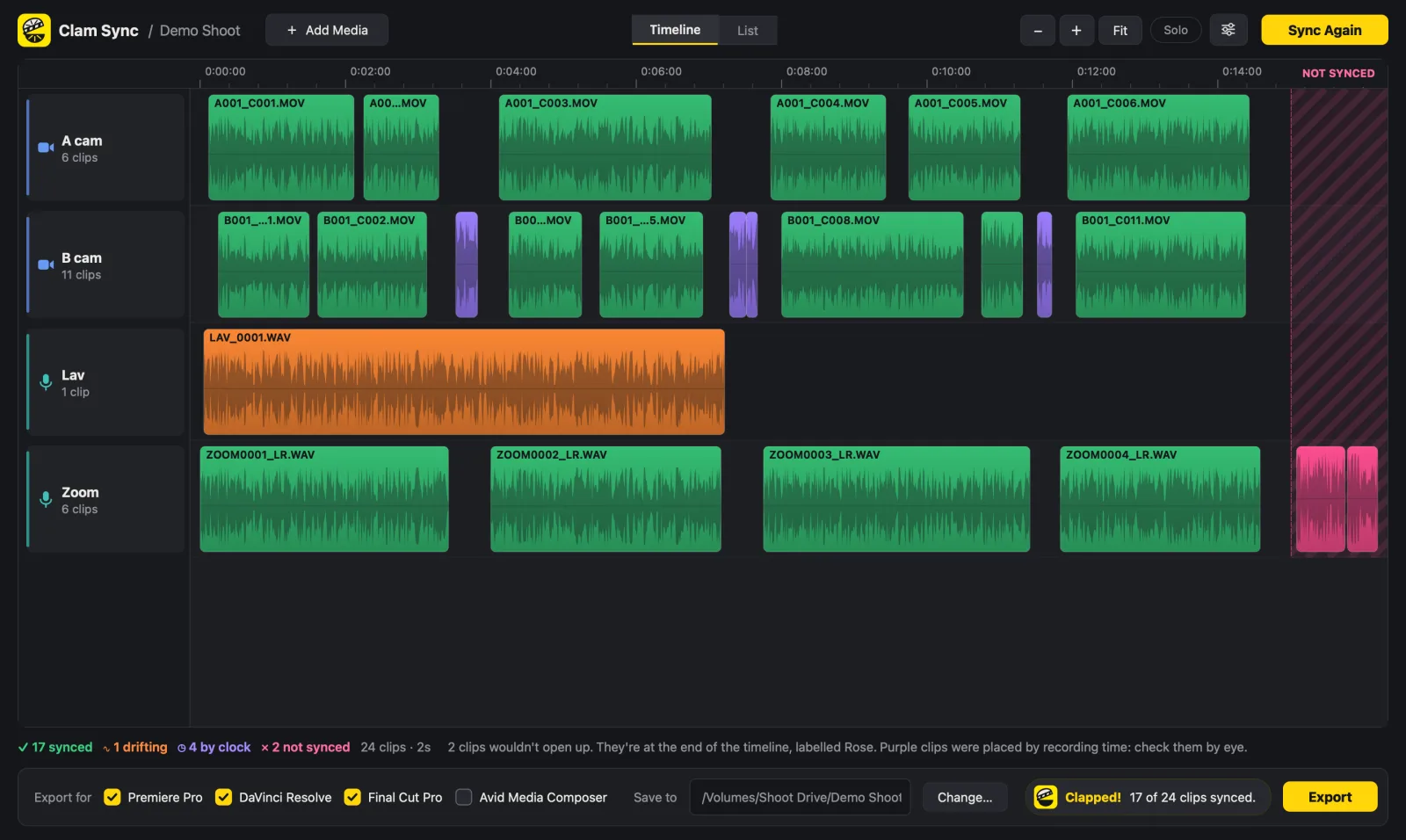
Clips slide into place and are coloured by how they were synced. Anything that needs a look is easy to spot, and nothing is left out.
Open it in your editor
Export for Premiere Pro, DaVinci Resolve, Final Cut Pro or Avid Media Composer, plus a sync report. Your camera files are only ever read, never moved or changed.
Features
Built for real shoots
Long days, lots of takes, cameras whose clocks were never set, scratch audio that sounds nothing like the recorder. That's what it was built on.
Syncs by sound
Matching is built for camera scratch audio against clean recorder audio, so a camera across the room still lines up. Every match gets a confidence score, and weak ones are thrown out rather than trusted.
Uses timecode when you have it
Jam-synced cameras and recorders are checked against the audio, then used to place what the audio can't, like a camera with no mic. If a camera lost its jam, you're told.
Works out wrong camera clocks
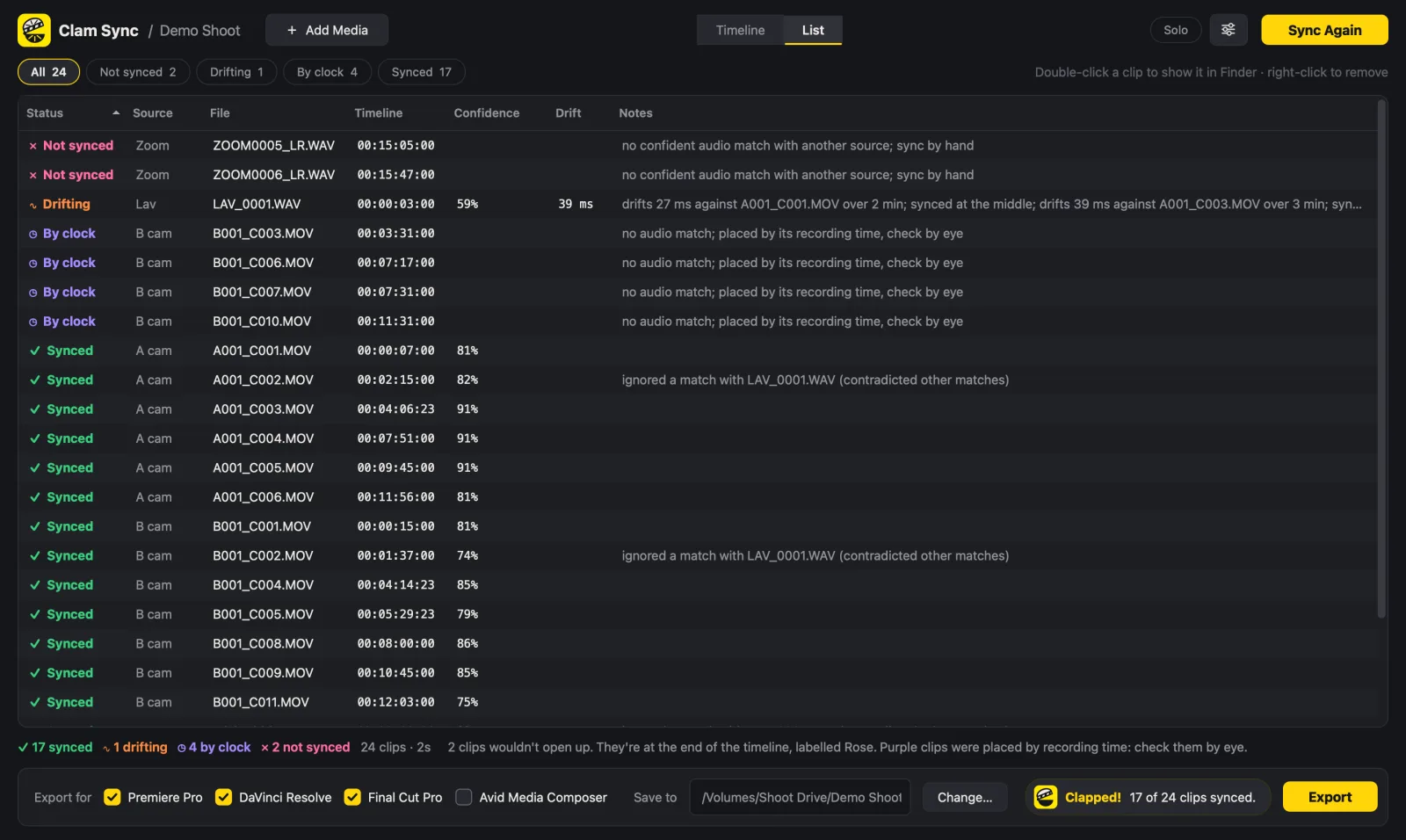
Clips with no usable sound can be placed by their recording time. Each camera's clock error is measured from its synced clips first, so a clock that's an hour out doesn't matter.
Catches drift
Long takes are measured at the start and the end. If a recorder drifts by more than half a frame, the clip is synced at the middle and flagged.
Never loses a clip
Clips that can't be synced go at the end of the timeline after a clear gap, coloured and marked so you can find them in any editor. A sync report lists every clip with its position, confidence and status.
Handles big, messy shoots
Hundreds of clips over several days. Folders holding two cameras are split by camera model, duplicate WAV copies are spotted, and slow-motion clips are recognised.
Exact to the sample
Recorder audio is placed to the sample, not just the nearest frame, in Premiere Pro, Resolve and Final Cut Pro. Mixed frame rates and NTSC rates are handled.
Final Cut multicam
For Final Cut Pro you can also get a ready-made multicam clip, with each camera and recorder as an angle, plus roles named after your sources.
Private, and works offline
Everything happens on your computer. Your footage isn't uploaded anywhere, and syncing doesn't need an internet connection.
See what happened
Every clip tells you how it was synced
The timeline and list show each clip's status, using the same colours in the app, in Premiere Pro, and as markers in Final Cut Pro and Avid.
- Synced by sound
- Placed by timecode
- Placed by recording time
- Drifting
- Not synced, parked at the end
Why not your editor's built-in sync?
Built-in sync is fine for a clip or two
| Editor's built-in sync |  Clam Sync Clam Sync | |
|---|---|---|
| A whole day of takes from several cameras and recorders | Clip by clip, or one take at a time | Whole shoot in one go |
| Cameras whose clocks are wrong | Up to you | Worked out automatically |
| Clips that won't sync | Often silently out of place | Parked at the end and flagged |
| Drift on long takes | Not checked | Measured and flagged |
| Same sync for another editor | Start again | Export for all four |
Coming from another tool? See how Clam Sync compares as a PluralEyes alternative and a Syncaila alternative.
Tested on real shoots
What it did with real footage
176 clips
3.6 hours · every camera clip synced
DJI cameras and two DJI Mic recorders. The cameras' duplicate WAV copies were spotted and left off the timeline.
812 clips
Three days · synced in a few minutes
A Sony FX3 and A7 III with a RODE Wireless PRO, on an Apple silicon MacBook Pro. Camera clocks 55 and 14 minutes out were worked out and corrected, and the A7 III's drift was flagged.
2 ms
Measured in Resolve's own render
Imported into Premiere Pro, DaVinci Resolve and Final Cut Pro and checked against the sound. In Premiere, recorder audio lands exactly on the sample.
Pricing
Try it free. Pay once if it earns its place.
Sync and preview a shoot of any size for free. When you need bigger exports, pay once. No subscription.
Free
$0
Free for good
To try it on your own footage.
- Sync and preview a shoot of any size
- Export up to 20 clips on 2 tracks
- Premiere Pro, DaVinci Resolve, Final Cut Pro and Avid
- Mac and Windows
Project Pass
$29
90 days, for one job. Doesn't renew.
- Everything, unlimited clips and tracks, for 90 days
- Upgrade to Solo during the pass, or up to 14 days after, and the $29 comes off
- Up to two computers
Solo Best value
$149
One-time payment. Yours to keep.
- Unlimited clips and tracks
- Sync by sound and timecode, drift checks, clock correction
- All four editors, plus Final Cut multicam clips
- Up to two computers, Mac or Windows in any mix
- Includes a year of updates; then $49 a year for more, if you want them
Prices in US dollars, plus VAT or sales tax where it applies. Student, teacher and team discounts, and answers about licences: pricing details.
Questions
Before you try it
Do I need to export a timeline from my editor first?
No. Drag your footage folders straight into Clam Sync: one folder per camera or recorder, the way cards come off set. If you've already started a rough timeline, you can drop in its XML instead.
Is my footage uploaded anywhere?
No. Clam Sync reads your files on your own computer and never uploads them. Syncing works offline; the app only goes online to check a licence key and look for updates.
What can I do with the free version?
Everything except a big export: add a shoot of any size, sync it and check every clip. Exports are limited to 20 clips on 2 tracks, so you can see it work on your own footage before you pay.
Which cameras and recorders does it work with?
Anything that records common video or audio files: MOV, MP4, MXF, MTS, WAV, AIFF, M4A and more. It has been tested on real shoots from Sony, DJI and RODE gear. Phone clips with a variable frame rate are flagged so you can check them.
What if a clip won't sync?
It goes at the end of the timeline after a clear gap, coloured and marked so you can find it, and sync it by hand. Nothing is dropped and nothing is quietly put in the wrong place.
Does it work with the free version of DaVinci Resolve?
Yes. The Resolve export is an FCPXML timeline, which the free version imports through File → Import → Timeline.
More answers in the FAQ.
Try it on your next shoot
Coming soon. Works on macOS 12.3 or later (Apple silicon and Intel) and Windows 10 or 11.